FROM TWO PHOTOS TO ONE GREAT MESS
How to Make the Coffee Fail AI Video (Step-by-Step)
Two baristas, one red mug and a spectacular lack of coordination. Turn the coffee-and-milk gag into a personalized video with people, dogs or cats.
What you need
Have two clear photos ready: one for each kitchen role, showing an adult or a pet. You can use the same permitted photo twice. You also need a browser, an account and enough credits for the quality you choose. Watch the examples before buying; a personalized generation uses credits.
Watch the coffee fail effect first
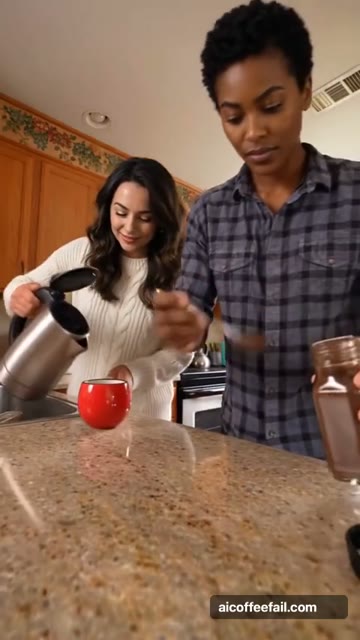
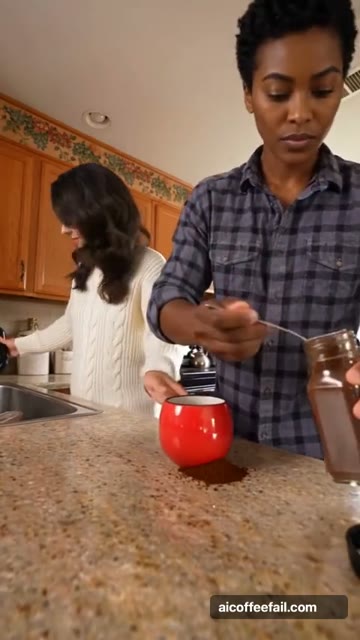
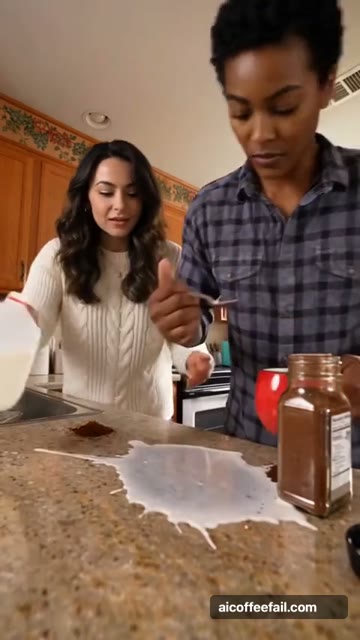
The right character confidently spoons coffee onto the counter. The left pours water into the mug, then milk where the mug used to be. Both remain completely serious.
Coffee Fail, Celebrity Kitchen and the Coffee Making AI Trend describe this kitchen-comedy format. Watch the example with sound before choosing your cast, then follow the steps below to make your own version.
Open the generator →The scene, beat by beat
The visual payoff follows three beats. Timing can vary in a personalized generation.
Make your video in five steps
Choose your cast and watch a template
Use Celebrity Kitchen for two people or Dog Coffee Fail for two pets. The homepage also offers couples, friends and cats. Click a template’s play area to watch the full video, then select “Use this template” to start creating.
Prepare one clear photo per role
For people, choose a sharp, evenly lit portrait with the whole face visible. For pets, keep the muzzle, ears and coat markings clear. Use one adult or one pet per image, with permission to animate them. JPG, PNG and WebP files must be under 10 MB, with each side from 301 to 5,999 pixels and an aspect ratio between 2:5 and 5:2.
Match the photos to the kitchen roles
The Coffee maker stands on the right with the teaspoon. The Milk pourer stands on the left with the kettle and jug. All six templates need two photos, one for each person or pet.
Choose quality and a credit pack
720p HD is selected by default. Its $9.90 starter includes 150 credits, enough for one HD video. The $6.99 pack contains 100 credits for one 480p video and does not unlock HD. Larger packs improve the credit rate, with savings up to 29.98%. Each personalized video is a 15-second vertical MP4. Purchases are one-time, with no subscription.
Generate, listen and download
Sign in, confirm permission to use the photos and submit the job. Progress appears in “My videos”; you can leave and return to the same account. When rendering finishes, the selected template’s original soundtrack is combined with the video. Play it with sound or download the MP4. No extra AI music or narration is generated.
Get a clearer result
Keep faces unobstructed
Small faces, sunglasses, strong filters and busy group shots make identity harder to preserve. Check each slot and use a clearer portrait when possible. AI resemblance, hands and fine details can vary; every submitted render uses credits.
Make pets easy to tell apart
Use one animal per photo and keep distinctive markings visible. Choose the dedicated dog or cat preset so the scene directions match the animal. Avoid hiding the muzzle behind a costume.
Check the template’s sound
The example player lets you hear the soundtrack used for that template. The final MP4 reuses this track. Soundtracks can differ between templates; no additional AI audio is created. Use “Enable sound” on an autoplay preview or the player’s volume control.
Template preview and final output
Every template includes a full video preview with original comedy soundtrack. Your personalized video lasts 15 seconds at the selected resolution. A download delay retries assembly of the same result rather than starting a second paid render.
Share your coffee fail
After the finished MP4 appears in My videos, download it and add a caption that explains the casting joke. Try “Our morning routine before the first sip” for a couple or “The café is open. Management is concerned” for two dogs. Find more coffee fail meme ideas.
Tell viewers the scene is AI-generated and use the platform’s AI label where applicable. Check the platform’s music rules before posting, especially for commercial use. The selected example’s soundtrack is included in the video.
Questions about making a Coffee Fail AI video
Do I need to download a template?
No. Choose a prepared scene on the generator and add photos to its two slots. The template guide explains the scenes and roles.
Can I use one photo?
Both roles need a photo, but you can use the same permitted photo for both. Two different photos make the characters easier to tell apart.
Why does a face or pet look different?
AI resemblance and details can vary. A sharp, well-lit photo with an unobstructed face or visible pet markings gives the model a clearer reference. Review the photo before submitting: personalized renders use credits.